Every family organizer feature, in one place
Built for real family life, not tech enthusiasts.
Calendar, meals, grocery, tasks, garden, memories, and more: one household hub, synced in real time.
Everyday
Your household hub at a glance
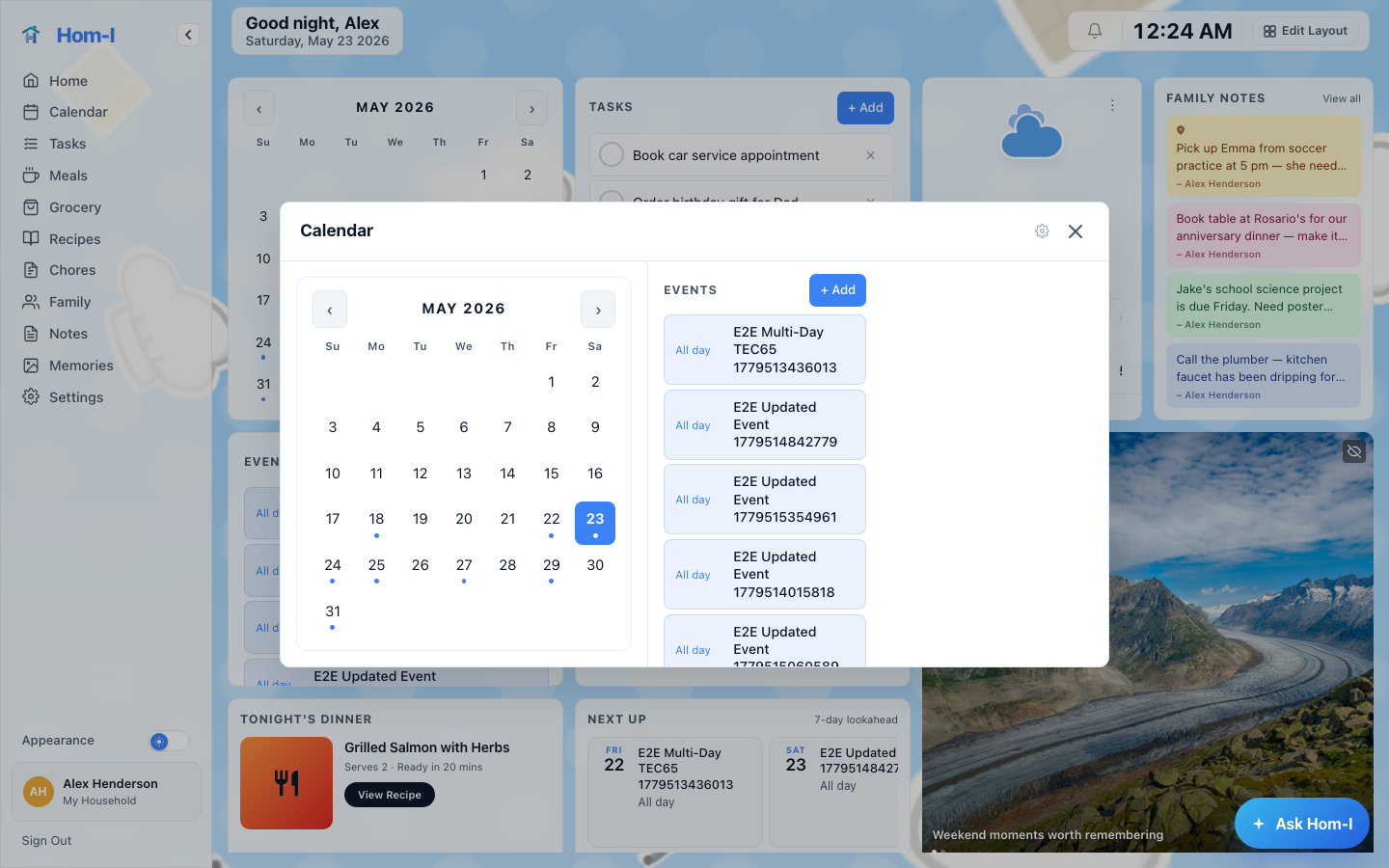
Family Calendar
One calendar everyone actually checks
See every family member's events in a single shared month view. Events update in real time: no more conflicting schedules or missed appointments. Browse any day's events in the day panel and jump straight to what's happening.
- Connects to Google Calendar, Apple iCloud (CalDAV), and Microsoft Outlook
- Add, view, and delete events from any device
- Event indicator dots at a glance: no scrolling required
- Tap any day to see a full list of its events in the day panel
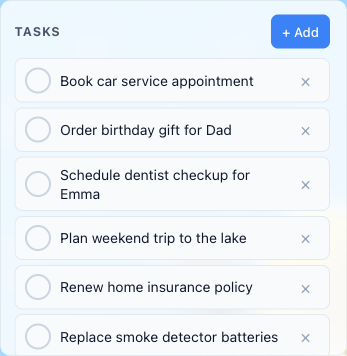
Shared To-Do Lists
Get things done, together
Create named lists (Household, Weekend, Home Projects) and manage all your household tasks in one place. Tasks from connected providers merge into your named lists, so everything stays together. Filter which lists appear on the dashboard so you only see what matters.
- Connects to Microsoft To Do, Todoist, Trello, and Google Tasks
- Organize tasks into named lists
- Tasks update across all devices in real time
- See incomplete tasks and anything completed today
Dashboard Customization
Drag, resize, and reorder widgets to build the view that works best for your household. Add or remove modules, then restore defaults anytime.
- Drag-and-drop widget grid
- Resizable panels
- Per-user layout preferences
- Restore defaults with one tap
Next Up
A glanceable widget that surfaces what's coming: your nearest calendar event, upcoming tasks, and a quick read of the day ahead.
- Next calendar event shown at a glance
- Upcoming tasks surface automatically
- Pulls from live household data
- Always on the dashboard
Tonight's Dinner
Surfaces tonight's planned meal front and center on the dashboard, with a direct link to the full recipe if one is attached.
- Tonight's meal and recipe link at a glance
- Updates automatically from the meal planner
- Visible without opening any other screen
- Zero extra taps
Weather
A glanceable weather widget shows today's conditions and a short-range outlook for your location, right on the dashboard.
- Current conditions at a glance
- 3-day outlook on the dashboard
- Location-aware
- Refreshes automatically
Kiosk Mode
Display Hom-I on a dedicated screen or tablet as an always-on household hub. Kiosk mode is available today with assisted setup: a self-serve setup flow is in progress.
- Always-on household display
- Shows calendar, meals, and tasks at a glance
- Assisted setup now: contact support@hom-i.net
- Self-serve setup flow coming soon
Food & Meals
From meal planning to the grocery run
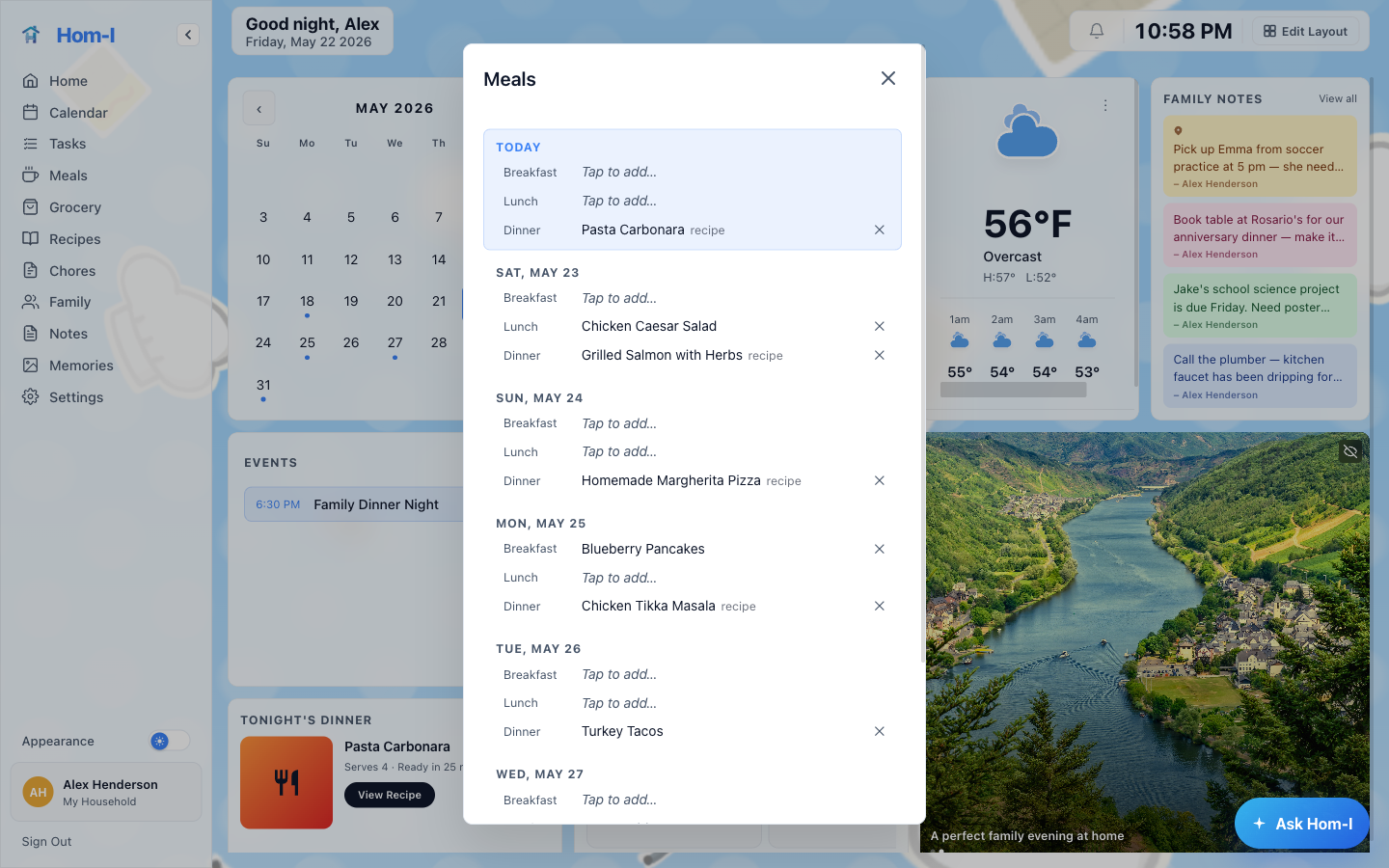
Meal Planner
Never ask "what's for dinner?" again
Plan your week's meals in minutes. Link meals to your saved recipes and Hom-I does the rest: ingredients flow automatically into your grocery list, quantities are consolidated, and tonight's dinner surfaces on the dashboard so everyone knows what's cooking.
- Rolling 7-day view: today plus the next six days
- Supports Breakfast, Lunch, Dinner, and Snacks
- Link a meal to a saved recipe: name it the same and it auto-links
- Linked recipe ingredients automatically populate the grocery list
- Tonight's Dinner widget on the dashboard keeps the whole family informed
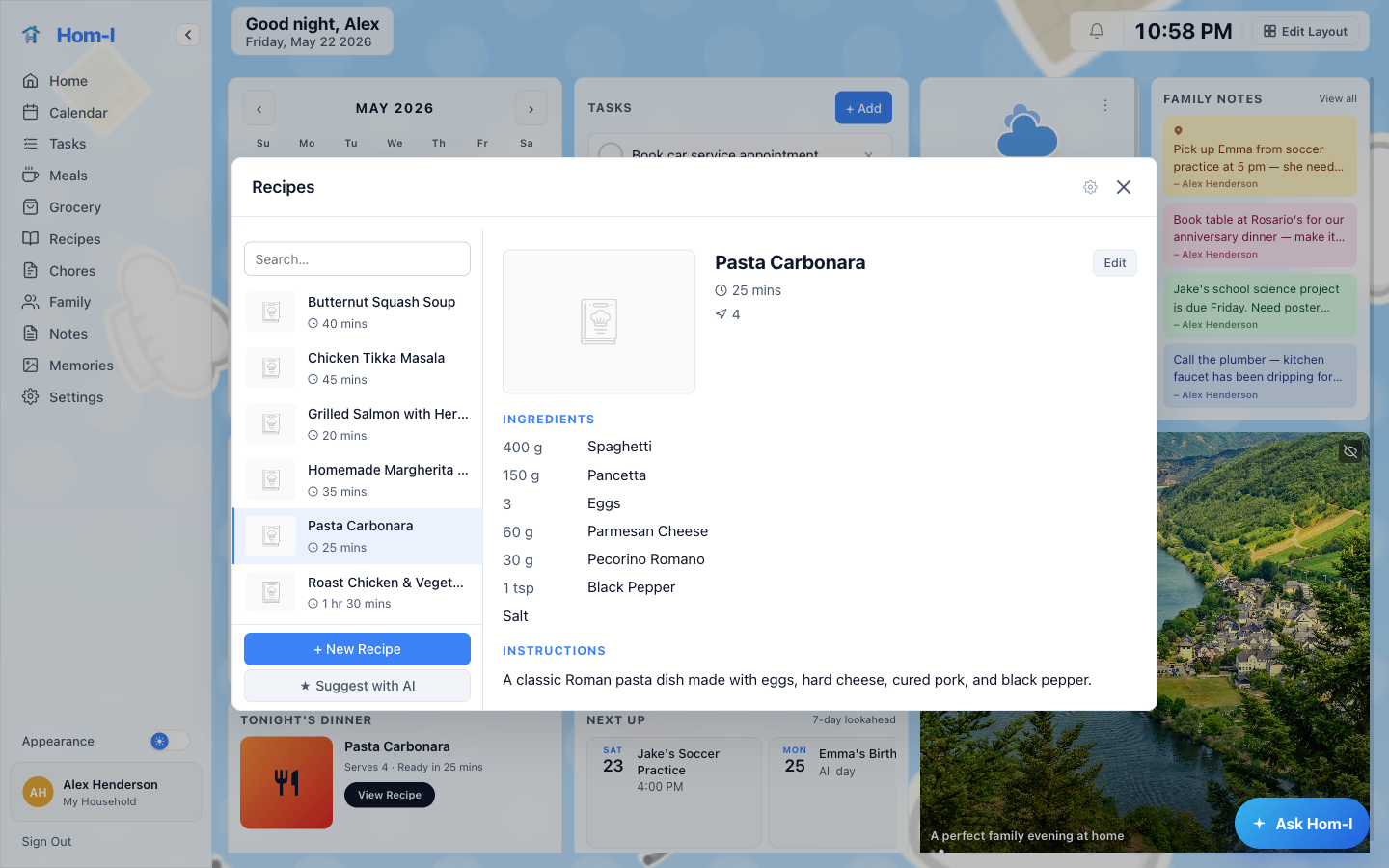
Recipe Book
Your family recipes, beautifully organized
Build a personal recipe library with structured ingredients, cook times, and serving sizes. Link any recipe to your meal plan and its ingredients flow straight into your grocery list. AI can generate new recipes from a free-form description.
- Store all your family's favorite recipes in one place
- Structured ingredients with brand, quantity, and unit, used by the grocery list
- Cook time and serving size at a glance
- AI-assisted recipe generation from a free-form description
- Link recipes to meals: ingredients auto-populate the grocery list
Smart Grocery List
One list. No duplicates. No stress.
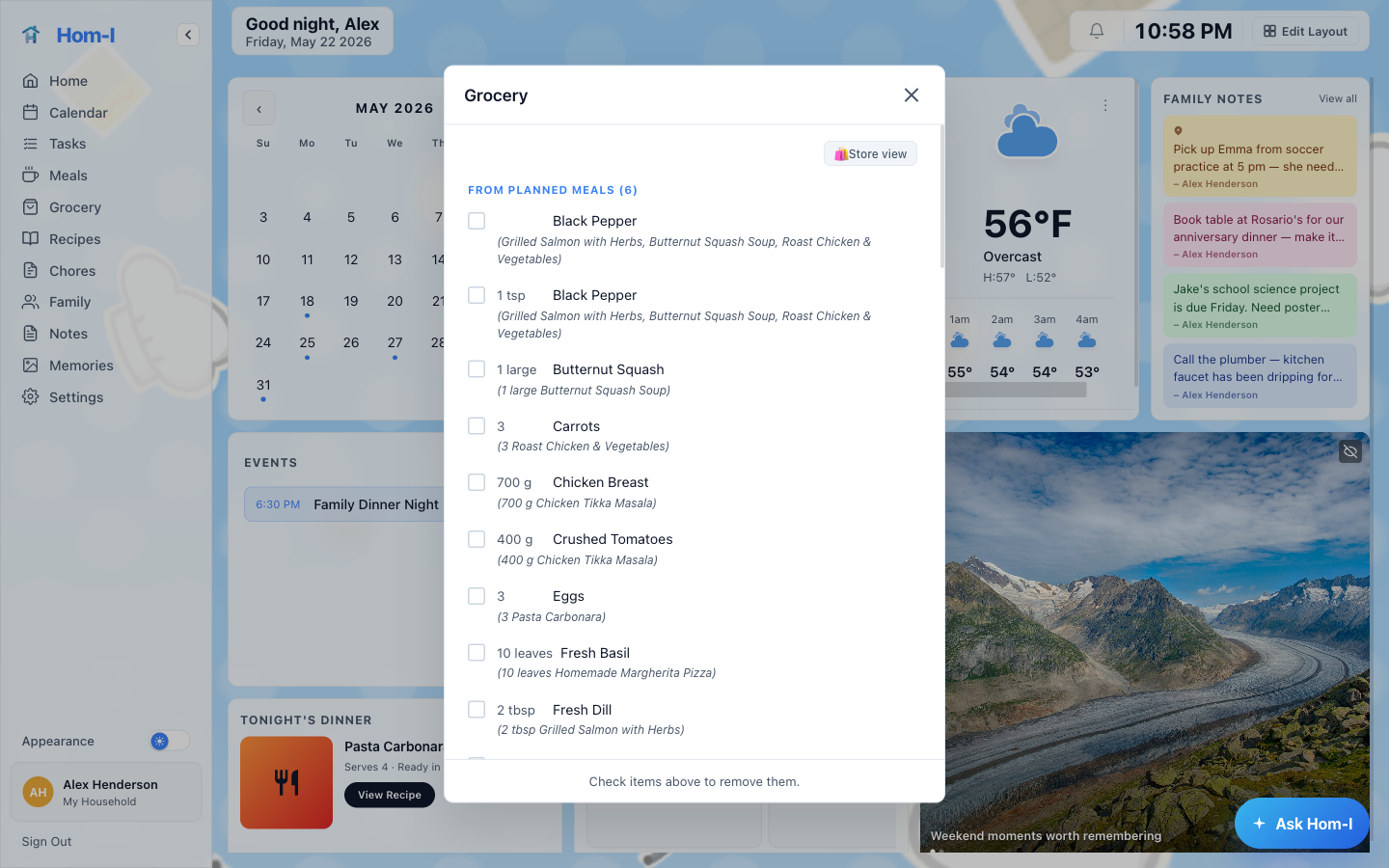
Your grocery list builds itself from linked meal recipes. Same ingredient across multiple meals? Quantities are summed automatically. Add one-off items manually or set up weekly staples that reappear each week.
- Ingredients from linked meal recipes flow in automatically
- Same ingredient across multiple meals: quantities consolidated into one line
- Add one-off manual items or weekly staple templates
- Real-time sync: everyone sees updates instantly
- Kroger cart integration: resolve items to products and add to your Kroger cart
Home & Family
Capture moments and stay on top of home life
Family Memories
Capture the moments that matter
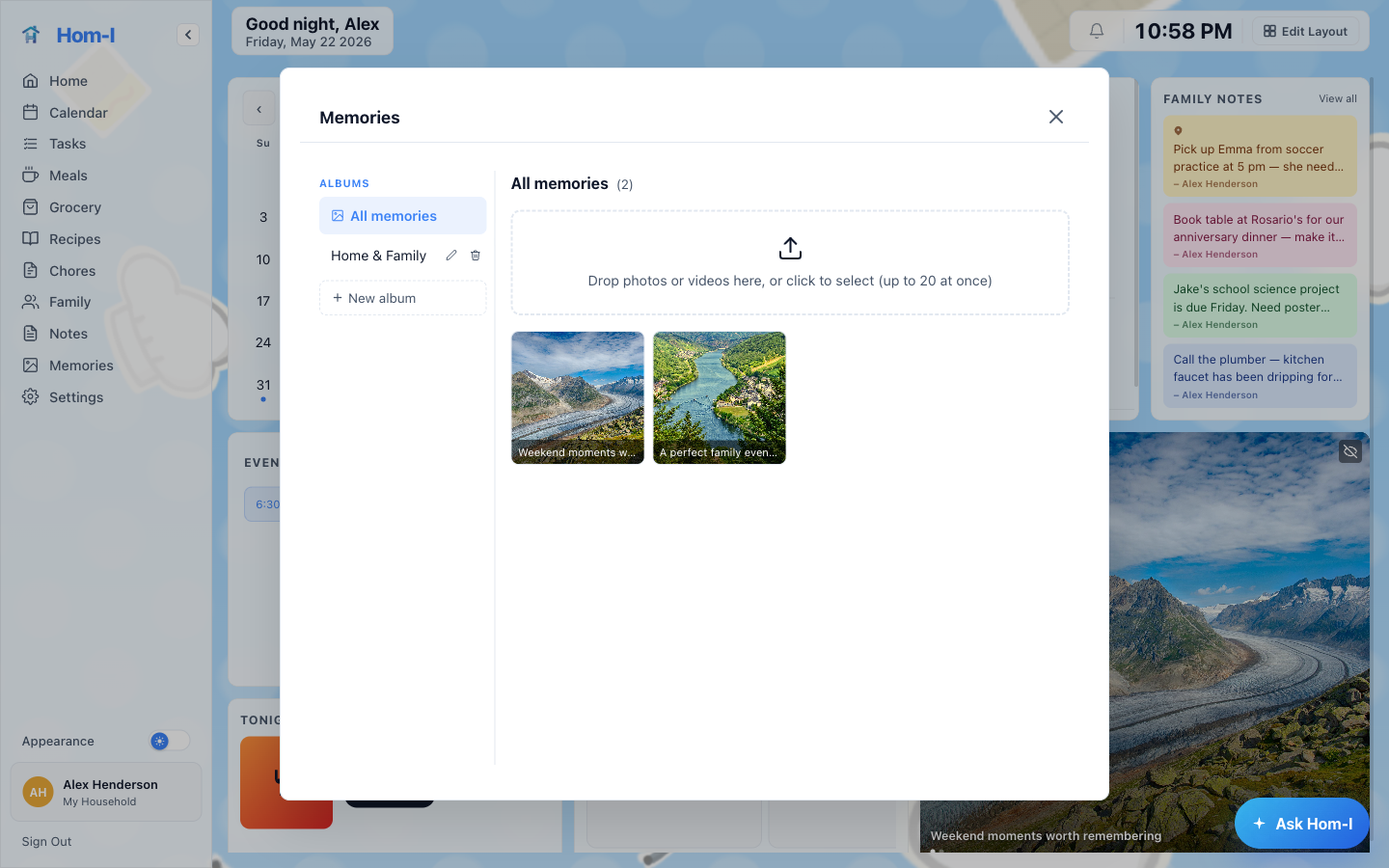
A shared photo journal for the whole household. Upload photos, add captions, and build a running visual diary of family life. Everyone in the household can contribute and browse the timeline.
- Shared album everyone in the household can add to
- Upload photos with captions and dates
- Browse your family timeline at any time
- Accessible from any device
Family Notes
A shared notepad for the household. Pin reminders, jot down quick thoughts, or keep important household info in one accessible place.
- Free-form notes shared with all household members
- Quick-add from the dashboard
- Markdown formatting supported
- Always accessible
Chore Rotation
Assign recurring household chores and rotate them automatically. Everyone knows their responsibilities without any nagging.
- Define chores with name and frequency
- Assign to household members
- Automatic weekly rotation
- Mark complete with one tap
Garden Tracker
Keep track of everything you're growing. Log plants, plots, and care notes in a shared garden journal your whole household can contribute to.
- Add plants and plots with names and notes
- Edit plant details any time
- Log timestamped care notes — watering, fertilizing, pruning, and more
- Shared garden log visible to all household members
- Accessible from any device
Assistants
Smart tools that surface what matters
Hom-I Chat Assistant
Ask questions. Get things done. By voice or text.
Hom-I's built-in chat assistant lets you interact with your household data using natural voice or text. Ask what's happening today, add a to-do, schedule a calendar event, plan a meal, or kick off AI recipe generation, all through a single conversational interface.
- Voice and text modes: switch between them any time
- Ask what's on today: events, meals, and tasks from live household data
- Add to-dos and create calendar events by asking
- Plan meals and trigger AI recipe generation by voice or text
On the Go
Hom-I in your pocket, anywhere you are
Quick Grocery Updates
Check off items as you shop or add new ones on the fly. The list syncs instantly: everyone at home sees what's already in the cart.
- Check off items with one tap
- Add items from anywhere, anytime
- Real-time sync: no stale lists
- Shared across the whole household
Meal Planning on the Go
Browse your recipe library and fill in the week's meals from your phone. Changes reflect on the household dashboard immediately.
- Browse and assign recipes from any device
- 7-day view fits comfortably on a phone screen
- Tonight's dinner surfaced on the dashboard
- Linked recipe ingredients flow to the grocery list
Calendar Glance
See today's events and what's coming up without opening a laptop. Add a quick event in seconds from wherever you are.
- Today's events at a glance
- Shared family calendar always in sync
- Add events from your phone in seconds
- Syncs with Google, iCloud, and Outlook
Quick To-Do Capture
Capture tasks the moment they come to mind, before you forget. They sync straight to your household lists.
- Add tasks from anywhere, instantly
- Syncs to shared household lists
- Works with Microsoft To Do, Todoist, and more
- No context switching required
Everything connects
Hom-I isn't a collection of separate features; it's one system where each piece feeds the next.
- 1
Build your Recipe Book
Store recipes with structured ingredients: brand, quantity, and unit are all captured for use downstream.
- 2
Link recipes to your Meal Planner
Name a meal the same as a recipe and it links automatically. One tap connects the two.
- 3
Grocery list builds itself
Every linked meal's ingredients flow into the grocery list. Same ingredient across multiple meals? Quantities are summed into a single line.
- 4
Tonight's Dinner on the dashboard
The Tonight's Dinner widget surfaces tonight's planned meal without opening anything else. Everyone gets a clear dinner plan at a glance, right from the dashboard.
- 5
Shop from your list or send it to Kroger
Tick off items as you shop, or resolve ingredients to Kroger products and add them directly to your Kroger cart.
- 6
Ask the Chat Assistant anything
What's on today? What do we need at the store? Kick off a new recipe. All answered from live household data, by voice or text.
Ready to try it?
One subscription. All features. Your whole household.
7 days free, then $12.99/month. Cancel anytime.
Start free trial